DNS Fundamentals: How the Internet Finds Its Way
Think about how you find someone's phone number. You don't memorize a string of digits for every person you know. You save their name in your contacts, and your phone looks up the number for you. If that person gets a new number, you update the contact once, and every call still goes through correctly.
DNS (Domain Name System) does exactly this for the internet. You type google.com, and somewhere behind the scenes, that name gets turned into the actual address of a server (a number like 142.250.64.110), so your computer knows where to send the request.
ping luanperosa.com
PING luanperosa.com (185.199.111.153) 56(84) bytes of data.
64 bytes from cdn-185-199-111-153.github.com (185.199.111.153): icmp_seq=1 ttl=58 time=310 ms
64 bytes from cdn-185-199-111-153.github.com (185.199.111.153): icmp_seq=2 ttl=58 time=3.74 ms
So luanperosa.com is pointing to the IP address 185.199.111.153.
The Problem DNS Solves
Every server on the internet is reachable through an IP address, not a name. google.com is really just a friendly label for whatever address google's servers happen to be using. That address isn't fixed forever: a company can move its servers, switch data centers, or repoint a domain to a different machine entirely.
So who keeps track of which name points to which address?
That's the whole job of DNS. It's a source of truth (the "phone book" of the internet) that maps a name to an address and keeps that mapping up to date.
The DNS Hierarchy
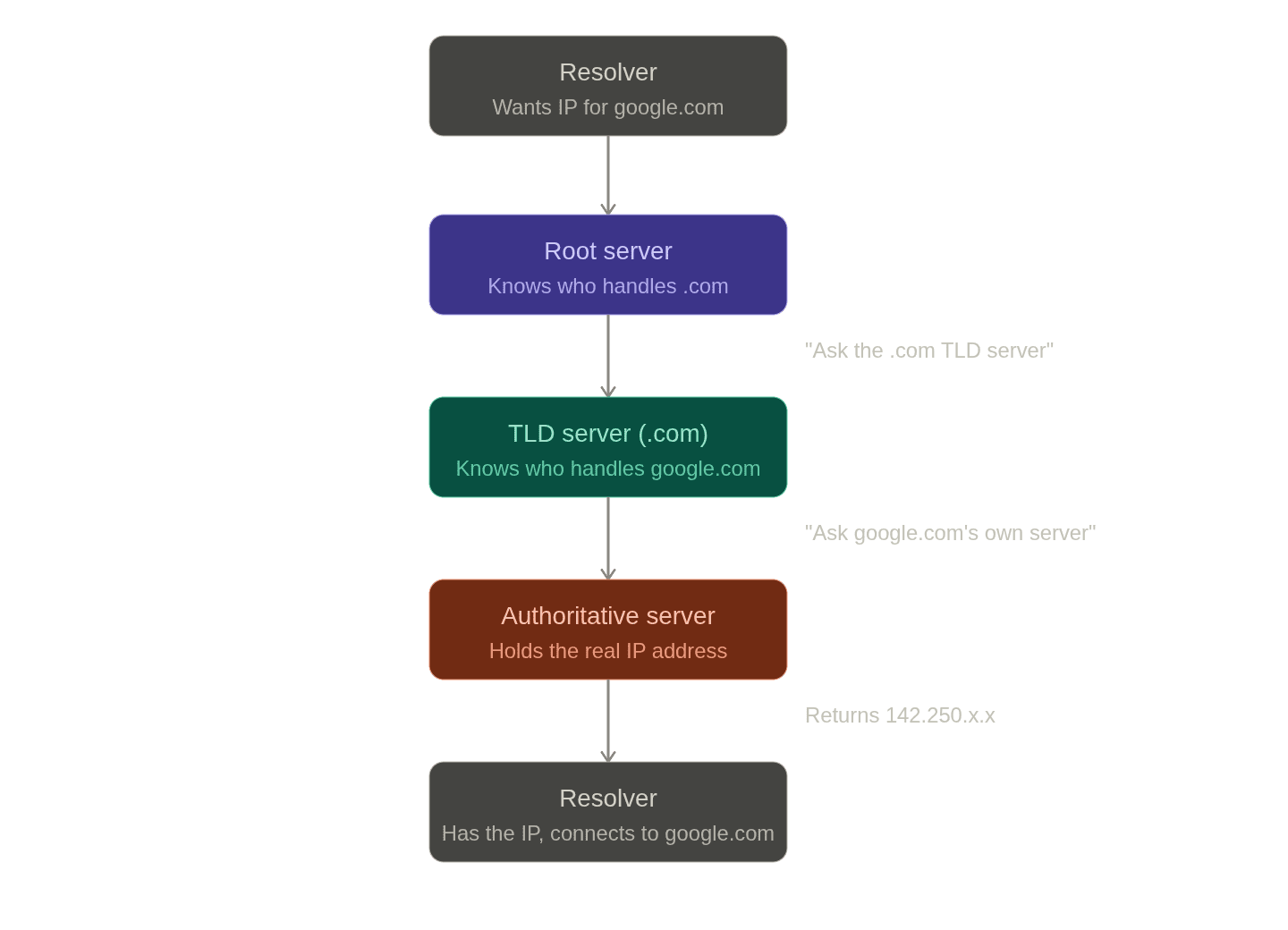
Let's go down the rabbit hole and see how DNS actually works. DNS isn't one big phone book sitting on a single server. That would be a bottleneck and a single point of failure for the entire internet. Instead, it's split into a hierarchy, where each level only needs to know a small slice of the answer: which server to ask next.
Let's trace what happens when something needs to resolve google.com (we'll come back to these steps later):
- Root server: the very top of the hierarchy. It doesn't know anything about
google.comspecifically, but it knows which server is responsible for all.comdomains. - TLD server (Top-Level Domain): responsible for a whole suffix like
.com. It doesn't know google's address either, but it knows which server is authoritative forgoogle.com. - Authoritative name server: the actual source of truth for
google.com. This one holds the real answer: the IP address.
Each level's job isn't "give me the answer": it's "point me to whoever knows more than I do."
Recursive vs. Iterative DNS Server Queries
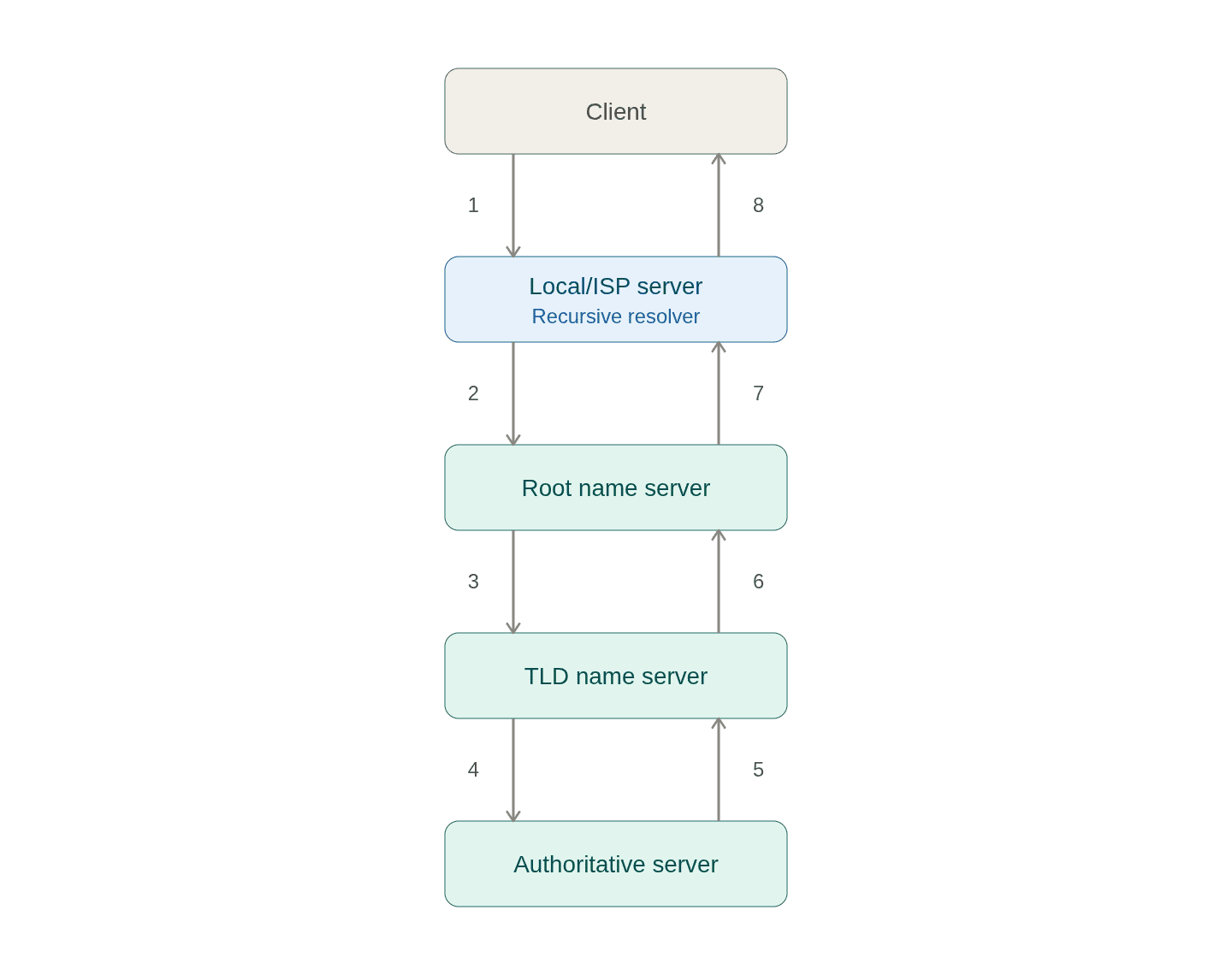
Recursive: you ask a server for the final answer. It's that server's job to return this information to you, and it will do all the work of asking the root, TLD, and authoritative servers for you. The flow looks like this:
- The resolver asks the root server for
google.com. - The root server requests the TLD server for
.com. - The TLD server requests the authoritative server for
google.com. - The authoritative server replies with the IP address to the TLD server, which replies to the root server, which replies to the resolver, which finally replies to your browser.
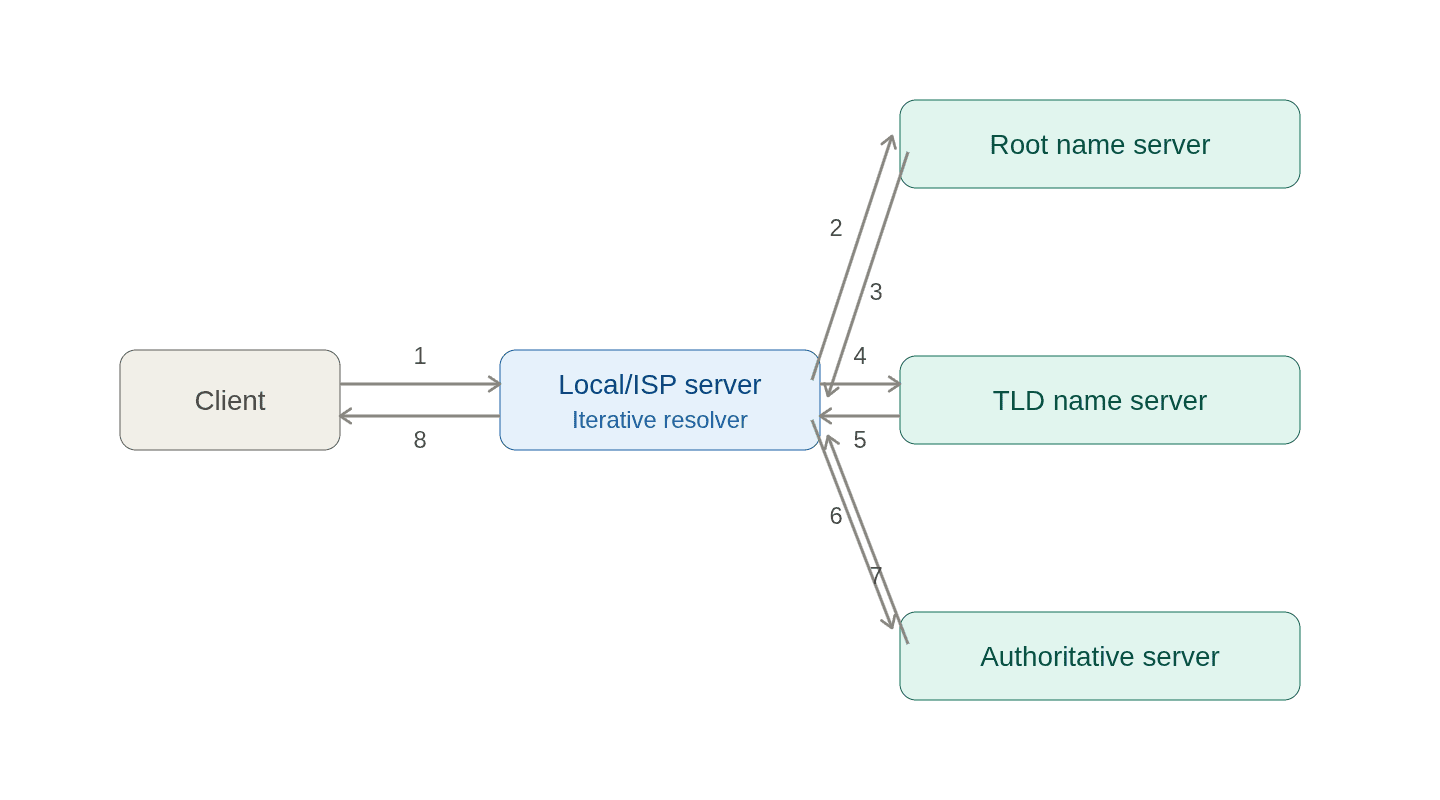
Iterative: the server you ask replies with the next server to ask. You then ask that server, and so on, until you eventually reach the authoritative server and get the final answer. This is the query your resolver sends to the root, TLD, and authoritative servers: "I don't know the answer, but I do know who to ask next."
- You type
google.cominto your browser. - The browser sends the query to a resolver, often one run by your ISP, probably a third-party service like Google or Cloudflare, or one built directly into the browser.
- The resolver asks the root server where to find
.comdomains. - The root server replies with the address of the TLD server.
- The resolver asks the TLD server where
google.comspecifically lives. - The TLD server replies with the address of the authoritative name server.
- The resolver asks the authoritative server for the actual IP address.
- The authoritative server replies with the IP, and the resolver hands it back to your browser.
DNS Records
The authoritative name server also holds a whole file's worth of information about that domain, called a zone file. Each entry in it is a DNS record, and different record types answer different questions about the same name.
Anatomy of a Domain Name
Before looking at the records themselves, it helps to see how a domain name is structured. Computers read domain names right to left, and example.com breaks down into:
- The root domain: an invisible trailing dot after
.comthat you never type or see, but that technically caps every fully-qualified domain name. - The top-level domain (TLD):
.comin this case. - The second-level domain:
example, the name registered under that TLD. - A subdomain: anything added to the left of the second-level domain, like
wwwinwww.example.comorftpinftp.example.com.
DNS records: the record for www.example.com is entirely distinct from the one for example.com, even though they share a second-level domain.
A and AAAA Records
The A record (address record) is the most common DNS record: it maps a domain name straight to an IPv4 address, a 32-bit number like 142.250.64.110. This is the record an authoritative server hands back for a plain lookup like example.com.
| Type | Name | IP Address | TTL |
|---|---|---|---|
| A | example.com | 142.250.64.110 | 3600 |
The AAAA record ("quad-A") does the same job for IPv6 addresses (same idea, just a longer address format). More on why IPv6 exists at all in the IPv4 and IPv6 section below.
| Type | Name | IP Address | TTL |
|---|---|---|---|
| AAAA | example.com | 2001:0db8:85a3:0000:0000:8a2e:0370:7334 | 3600 |
CNAME Records
A CNAME record doesn't point to an address at all: it points to another domain name, as an alias. Pointing www.example.com at example.com via a CNAME is a common pattern, and it's also how a subdomain running a different service on the same server (say ftp.example.com) gets routed: DNS resolves the CNAME to example.com, and the web server itself figures out from the requested URL which service the request was actually for. The CNAME section further down digs into why this indirection is useful.
| Type | Name | IP Address | TTL |
|---|---|---|---|
| CNAME | www.example.com | example.com | 3600 |
TTL
Every DNS record ships with a TTL (Time to Live): a number of seconds saying how long the record can be trusted before it needs to be looked up again. This is what makes the caching behavior described later in this post possible: as long as a record's TTL hasn't expired, it can be reused from a cache without going back to the authoritative server at all.
There are more DNS Records, but lets focus only on these for now. If you want to learn more, check out this list of DNS record types.
CNAME: When the Answer Is Another Name
As covered in DNS Records, sometimes the authoritative server's reply isn't an A or AAAA record at all. It's a CNAME record (Canonical Name) instead: an alias. Instead of saying "this domain lives at this IP," it says "this domain is just another name for that domain, go resolve that one instead."
A common example: www.github.com is configured as a CNAME pointing to github.com. Resolving www.github.com doesn't hand back an IP directly. It hands back "look up github.com instead," and the resolver repeats the same lookup process (hierarchy, cache, all of it) for that name until it eventually lands on a real IP address.
This extra indirection is genuinely useful:
- If
github.com's IP ever changes,www.github.comdoesn't need to be touched at all. It just keeps pointing at the name, and only that name's own record needs updating. - It's how a lot of apps hosted on platforms like Vercel or Netlify hook up a custom domain: you point your domain at something like
cname.vercel-dns.com, and the platform is free to move which IP that resolves to behind the scenes, without you ever touching your own DNS settings again.
What about IP Address?
At the end of every DNS lookup, you're left holding an IP address. But what actually is that number?
Actually the explanation of IP addresses is a whole topic in itself, so let's just cover the basics here.
An IP address is an identifier, like a mailing address, but for a device on a network. It's how one machine tells another "send your response here." Without one, there's no way to know where a request should even go, name resolution or not.
IPv4 and IPv6
Most of the addresses you're used to look like 142.250.64.110: four numbers between 0 and 255, separated by dots. That's IPv4, and it caps out at roughly 4 billion unique addresses.
4 billion sounds like a lot, until you count every phone, laptop, router, smart fridge, car, and server connected to the internet today. That number was passed a while ago. That's what IPv6 exists to fix: a much longer address written in hexadecimal groups separated by colons (something like 2001:0db8:85a3::8a2e:0370:7334), with room for roughly 340 undecillion addresses. That headroom is part of why IoT devices increasingly ship with IPv6 support built in.
Public vs. Private IP Addresses
Here's the detail that quietly keeps IPv4 from actually running out: not every device needs a globally unique address.
- A public IP is reachable from anywhere on the internet: this is the address DNS ultimately resolves a domain to.
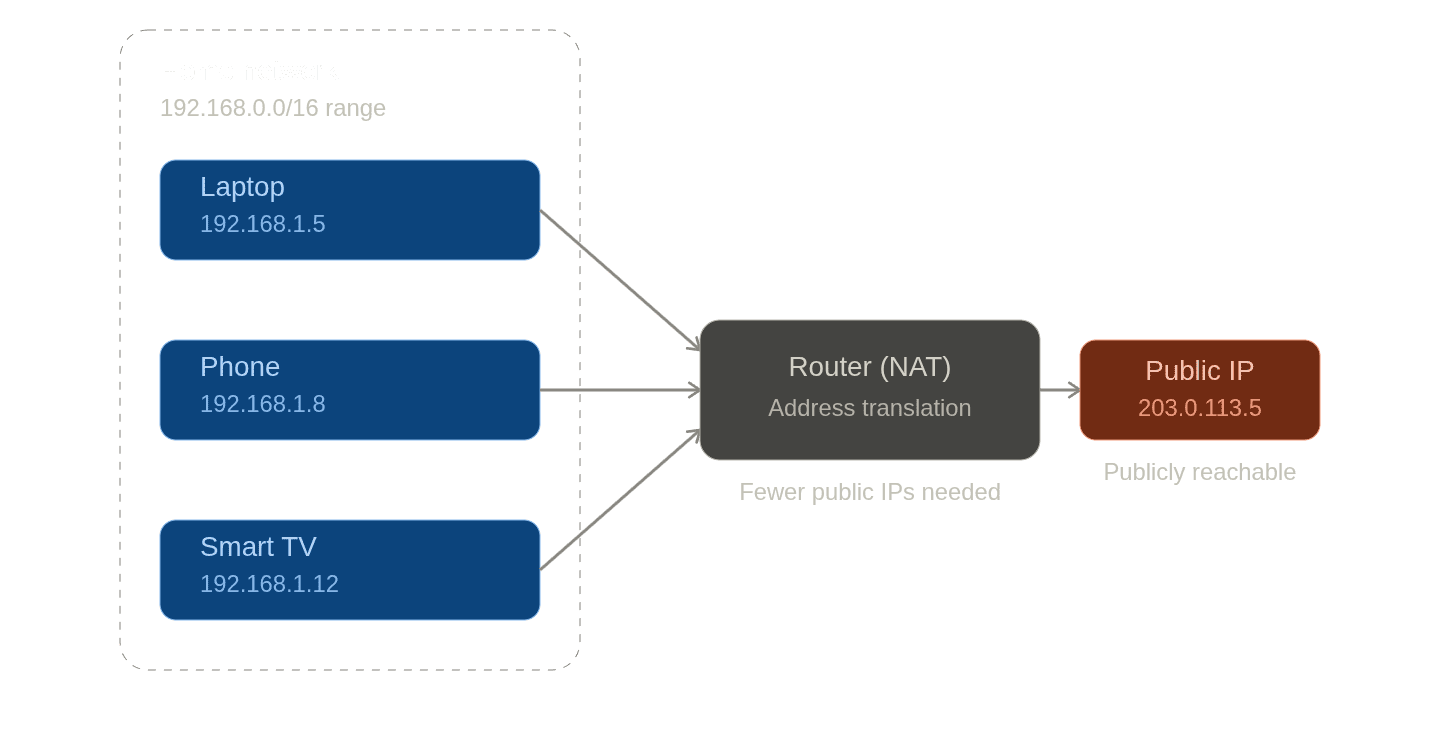
- A private IP is only meaningful inside a local network: your laptop, phone, and smart TV at home each have one, but they're invisible from outside your router.
Private IPs live in a few reserved ranges: 10.0.0.0/8, 172.16.0.0/12, and 192.168.0.0/16. That's why almost every home router hands out addresses like 192.168.1.5: that range is set aside for exactly this, and it's reused in millions of homes at once without conflict, because it never needs to be unique outside your own network.
The mechanism that makes this work is NAT (Network Address Translation): your router keeps one public IP and quietly translates traffic between that single public address and however many private IPs sit behind it. That's how a pool of "only" 4 billion addresses ends up serving vastly more than 4 billion devices. Most of them never need a public address of their own.
There's a security upside here too: a device that's never publicly reachable can't be attacked directly from the internet. That's why well-designed systems try to minimize what actually sits on a public IP: usually just a load balancer or API gateway at the edge, with databases and internal services kept private behind it.
IP addresses can also be static (fixed, predictable, typical for servers) or dynamic (reassigned periodically, typical for home internet connections). Static addresses are what let a DNS record point at a server with any confidence it'll still be there tomorrow.
One IP, Many Domains: Virtual Hosting
Recall the CNAME example earlier. Here's a fact that complicates the "one IP, one server" mental model: the same public IP can serve completely unrelated domains.
Platforms like Vercel or Netlify host thousands of different customer domains, and many of them resolve to the exact same IP address. When a request lands on that shared server, the platform still has to figure out which of its thousands of customers the request is actually for.
For plain HTTP, that's as simple as reading the Host header, the part of the request that names which domain it was meant for. But almost all of this traffic is HTTPS, and the Host header only exists inside the encrypted HTTP request, which the server can't read until after it's already picked a TLS certificate and terminated the connection. So the first hint of which domain the request is for actually arrives earlier, during the TLS handshake itself, via a field called SNI (Server Name Indication), sent in the clear before encryption kicks in. The platform uses SNI to pick the right certificate and route the connection to the right customer's backend, then reads the Host header as usual once the request is decrypted.
This whole mechanism is called virtual hosting, and it's why a domain resolving to an IP doesn't necessarily mean that domain has a dedicated machine of its own.
Redundancy: No Single Point of Failure
A hierarchy is only as reliable as the servers at each level. If there were truly just one root server, one hiccup would take down name resolution for the entire internet.
In practice, there are 13 root server addresses, operated by 12 different organizations around the world. Behind those 13 addresses sit close to 2,000 physical replicas, spread across data centers globally. A query to "the root server" is really answered by whichever replica is closest to you, which spreads the load and means no single machine (or even a single organization) is a chokepoint for the whole system.
Caching: Most Queries Never Reach the Hierarchy
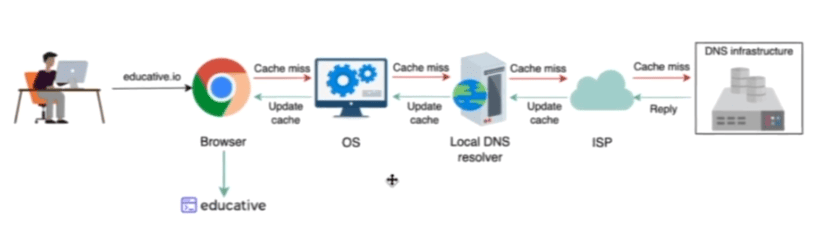
Here's the part that makes DNS actually feel instant in practice: most of the time, none of the steps above happen at all.
If you visited google.com thirty minutes ago, it's extremely unlikely its IP address has changed since then. So instead of repeating the full lookup, several layers check their own memory first:
- Browser cache: did this browser already resolve this domain recently?
- OS cache: did any app on this machine already resolve it?
- Resolver / ISP cache: has anyone else on the same ISP already resolved it? (If you live in a big city, thousands of other people have probably already triggered this exact lookup.)
- DNS infrastructure (root → TLD → authoritative): only reached if none of the above have an answer.
Each cached answer respects the record's TTL (introduced in DNS Records). While the TTL hasn't expired, the cached IP is used directly. Once it expires, the entry goes stale and can't be used: the lookup falls through to the next layer exactly as if it had never been cached, worst case all the way down to the root server.
This is why, in practice, the vast majority of DNS lookups never touch a root, TLD, or authoritative server at all. They're absorbed by caching well before that.
DNS Routing Strategies
One clarification before this last part: DNS resolves a domain to an IP address; it doesn't route the actual request. Once you have the IP, your request travels there on its own; DNS's only job was picking which IP to hand back. But that choice is exactly where things get interesting, because the authoritative server doesn't have to give the same answer to everyone.
Say a company runs servers in São Paulo, Frankfurt, and Tokyo. When someone resolves example.com, which of those three IPs should they get back? A few strategies exist for making that call:
- Geolocation routing: return the IP closest to the user's location. A visitor from Brazil gets São Paulo's IP, a visitor from Japan gets Tokyo's. This isn't automatic just because someone's browsing from Brazil, either. It's a deliberate rule the DNS provider configures. (Let's say a company with a global audience that wants to keep all traffic in the same region for regulatory reasons or due to the target audience.)
- Latency-based routing: similar idea, but based on measured latency rather than geography. Usually the two line up, but not always (network paths don't always follow a straight line on a map).
- Failover routing: a backup plan, not a first choice. Keep sending traffic to the primary server, and only switch to a secondary one if the primary stops responding. This is what keeps a regional outage from becoming a global one.
- IP-based routing: instead of inferring a region from the requester's IP the way geolocation routing does, you explicitly map specific IP ranges to endpoints yourself. Useful for things like sending all traffic from a company's known corporate VPN range to a specific internal-facing server.
- Weighted routing: split traffic by percentage across multiple servers (say, 70% to one, 30% to another), useful for balancing load between servers of different capacity, or for gradually shifting traffic during a migration.
- Multi-answer routing: instead of picking just one IP, return several healthy ones at once. The client can pick among them, which spreads load across servers without needing a dedicated load balancer, and gives it a fallback if one of those IPs doesn't respond.
None of these change what DNS fundamentally is: a name-to-IP lookup. They just mean the "right" IP for example.com can depend on who's asking, and from where.
Putting It All Together
Zoom back out, and DNS is a genuinely interesting distributed systems case study: how do you let anyone in the world resolve any domain, instantly, without any single server ever being overwhelmed, and while still giving different users different, more optimal answers?
The answer keeps coming back to the same handful of ideas: split the problem into a hierarchy so no one server needs the full picture, replicate critical infrastructure so no single failure is fatal, cache aggressively so most requests never reach the source of truth at all, and add a layer of indirection (CNAMEs, virtual hosting, routing strategies) so the answer to "where is this domain?" can adapt to circumstances.
That's DNS in a nutshell: a phone book for the internet, built to survive planet-scale traffic without falling over.
Some of the Most Common DNS Interview Questions
With all that in mind, so now we can answer properlly some of the most common interview questions about DNS, here are some of them:
- What is DNS and why is it important?
- DNS translates human-readable domain names into IP addresses, allowing users to access websites without memorizing complex numerical addresses.
- It is crucial for the functioning of the internet, as it enables seamless communication between devices and servers.
- Explain the difference between recursive and iterative DNS queries.
- Recursive queries involve a DNS resolver taking on the responsibility of finding the final answer for a domain name, querying multiple servers if necessary, and returning the result to the client. Iterative queries, on the other hand, involve the client receiving referrals from each server in the hierarchy, allowing it to query each server directly until it reaches the authoritative server for the domain.
- What are the different types of DNS records and their purposes?
- A Record: Maps a domain name to an IPv4 address.
- AAAA Record: Maps a domain name to an IPv6 address.
- CNAME Record: Creates an alias for a domain name, pointing it to another domain name.
- MX Record: Specifies the mail servers responsible for receiving email for a domain.
- TXT Record: Allows the domain owner to store arbitrary text data, often used for verification and security purposes.
- What is TTL (Time to Live) in DNS records?
- TTL is a value that specifies how long a DNS record can be cached by resolvers before it needs to be refreshed. It helps reduce the load on DNS servers and improves performance by allowing cached responses to be used for a certain period of time.
- How does DNS caching work?
- DNS caching stores previously resolved domain names and their corresponding IP addresses in a cache, allowing subsequent requests for the same domain to be answered quickly without querying the authoritative servers again. Caching occurs at various levels, including the browser, operating system, and DNS resolver.
Additional Resources
- What is DNS? (For Beginners) - freeCodeCamp
- What is DNS? - AWS Route 53
- DNS record types.
- O que é DNS? - This is a great video that explains DNS in a simple way.(Portuguese)
- DNS Records Explained. This is a great video that explains DNS records in a simple way.